In today's entry I'll say a few things about the 11th-grade English classes that I took at Vista High School in the 1978-1979 academic year, per the More English to come section at the beginning of my "Sods and Odds" post.
Fall
For the September-to-January semester I took an Advanced Composition 11A course that was initially run by Mr. James Hunter. At some point in the latter half of the semester (shortly after Thanksgiving, if memory serves) Mr. Hunter announced to the class that he would be leaving Vista High School for a position "in the computer field". He declined to specify exactly why he was leaving: "It's not you," he assured us. A Mr. Johnston* ran the remainder of the course.
*Per the Edward Johnston obituary at this page, I think Mr. Johnston's first name was Warren - he was the husband of my History 7 teacher at Lincoln Junior High School and took over for her shortly into the year as she was ill - but he wasn't in the La Revista 1979 yearbook and I don't know for certain.
I wrote my first five-paragraph essays and first term paper for Mr. Hunter's class.
• Regarding the former, Mr. Hunter handed out a photocopy of a five-paragraph essay that a previous-year student had written on Robert A. Heinlein's Stranger in a Strange Land as a model for us to follow. I read it over and thought, "Man, this is really contrived, does anyone actually write like this in the real world?" With 20/20 hindsight and from my current vantage point as a technical writer, I now recognize that such essays, and term papers, are meant to serve as introductory prototypes for formal reports that one may create in, say, the business world or a STEM-related profession.
• My term paper was on electronic keyboard instruments.
Literature-wise my 11th-grade English classes kept to an American authors theme, and for Mr. Hunter's class I and my fellow classmates accordingly read the following class novels:
Winesburg, Ohio: A Group of Tales of Ohio Small-Town Life by Sherwood Anderson,
The Catcher in the Rye by J. D. Salinger, and
A Separate Peace by John Knowles.
I relatedly wrote separate book reports on
Tortilla Flat by John Steinbeck and
R Is for Rocket by Ray Bradbury
but bucking the theme I also wrote reports on
Journey to the Centre of the Earth by Jules Verne and
King Arthur and the Knights of the Round Table by Antonia Fraser.
(Yes, I was listening to this guy at the time.)
One last point in the name of completeness before moving on:
For a while at the beginning of the semester Mr. Hunter had us play The Propaganda Game in class; perhaps this was meant to be a sort of critical thinking exercise but I thought it was a waste of time.
Spring
For the February-to-June semester I took an English Literature 11A course that from start to finish was run by Mrs. Laurene Tweed.
Mrs. Tweed's class was highlighted by a vocabulary-building unit that was designed to prepare us for the verbal section of the SAT, which we were to take the following year. (I confess I am 'not a fan' of standardized tests: they are useful to some extent but IMO they and their scores are taken much more seriously than should be the case.)
We read one class novel for Mrs. Tweed's class: The Scarlet Letter: A Romance by Nathaniel Hawthorne.
I relatedly wrote separate book reports on
The Sun Also Rises by Ernest Hemingway and
Dandelion Wine and
Something Wicked This Way Comes by Ray Bradbury.
Toward the end of the semester each student also presented an oral book report in front of the class: my presentation was on The Fountainhead by Ayn Rand as I was going through a (thankfully brief, hey, it happens to the best of us) Objectivist phase at the time.
Our coursework culminated in a term paper on an American author. I appropriately wrote my paper on Ray Bradbury: it discussed Bradbury's literary influences, his approach to the craft of writing, his advice for would-be authors, and his view of the future.
I'll cover my 10th-grade English classes in the following entry.
Thursday, April 26, 2018

Saturday, April 14, 2018
Listening to Songs at Random, or Not
At the beginning of my "I'd Like to Make a Request" post I briefly discussed the MP3.com music site and lamented what MP3.com had become vis-à-vis its salad days in the early 2000s. I continue to check in with MP3.com from time to time, in part out of curiosity, in part out of nostalgia, in part out of a hope that the site has improved.
New stuff
MP3.com had been dormant since April 2015 but there's been a flurry of activity there in the last couple of months.
(1) A new /2018/ directory features 20+ new articles, including a "Welcome Back to MP3.com! This Is Going to Be Big" announcement and a "Can You Name Every One of These '80s Hair Bands?" article/quiz that at present also takes up most of the home page.
(2) A new navigation menu at the top of the site points to '80s, '90s, '00s, and DOWNLOADS sections that at the time of writing are highlighted by a common "12 Great Songs You Totally Forgot Were From 1993"* article.
*1993? That was 25 years ago. And excepting "Soul to Squeeze" and "I Got You Babe" (OK, maybe not the Cher with Beavis and Butt-Head version), you probably were never familiar with these songs in the first place if you don't listen to urban contemporary radio. Where's U2's "Lemon"? Where's the Smashing Pumpkins' "Today"? But I digress.
2011-2017
MP3.com last underwent a major overhaul in June 2011. The heart of the 2011-2017 MP3.com was its /top-downloads/ Free Music collection of songs to stream or download, which is now gone. The current MP3.com still has a /top-downloads/ directory but it now contains a "How Old Was This '90s Pop Star When They Made It Big?" article/quiz and some links to external MP3.com resources and some advertising content and that would be it. Some of the /2018/ articles do feature videos but you know what I think about music videos.
Actually, all of the other 2011-2017 MP3.com directories and all of the textual content of those directories are still present at the current site; for example, if you go to http://mp3.com/free-mp3/ and scroll past the "12 Great Songs ... From 1993" article (all the way to the bottom of the page) you'll find links to the 2011-2017 site's Free MP3 of the Day articles although the .mp3 file downloads originally offered by those articles are no longer available.
The 2011-2017 MP3.com was a venue for underground artists, whereas the new MP3.com material focuses on hitmakers. If you prefer the former to the latter, however, all is not lost...
Back to the bars
The External links section of Wikipedia's MP3.com entry helpfully includes a link to the Internet Archive's collection of past and present MP3.com pages. I go to the 12 May 2014 capture (the one closest to the "I'd Like to Make a Request" 14 May 2014 publish date) to check out its Free Music songs. To my amazement and delight, I discover that the Internet Archive has also saved a great many of the original .mp3 files for those songs - just click the buttons and you've got 'em. (Clicking the buttons doesn't do anything.)
I note in "I'd Like to Make a Request" that I prefer to stream songs rather than download them. I go over to YouTube and run searches on several of the 12 May 2014 MP3.com Free Music songs: every one of them shows up. And what you get at YouTube is in most cases better sounding than an .mp3 file anyway.
The Internet Archive's MP3.com captures stretch back to the site's late-1990s origin. It is unlikely that you will find anything to stream or download in the charts sections of captures that predate the 2011 overhaul, but at least you will have artist name and song title information to work with.
In sum, a respectable chunk of the MP3.com 'database' is still there and waiting for you to explore it - you don't have to settle for "Can You Name Every One of These ’90s Boy Bands?".
We'll go back to high school English class in the next entry.
New stuff
MP3.com had been dormant since April 2015 but there's been a flurry of activity there in the last couple of months.
(1) A new /2018/ directory features 20+ new articles, including a "Welcome Back to MP3.com! This Is Going to Be Big" announcement and a "Can You Name Every One of These '80s Hair Bands?" article/quiz that at present also takes up most of the home page.
(2) A new navigation menu at the top of the site points to '80s, '90s, '00s, and DOWNLOADS sections that at the time of writing are highlighted by a common "12 Great Songs You Totally Forgot Were From 1993"* article.
*1993? That was 25 years ago. And excepting "Soul to Squeeze" and "I Got You Babe" (OK, maybe not the Cher with Beavis and Butt-Head version), you probably were never familiar with these songs in the first place if you don't listen to urban contemporary radio. Where's U2's "Lemon"? Where's the Smashing Pumpkins' "Today"? But I digress.
2011-2017
MP3.com last underwent a major overhaul in June 2011. The heart of the 2011-2017 MP3.com was its /top-downloads/ Free Music collection of songs to stream or download, which is now gone. The current MP3.com still has a /top-downloads/ directory but it now contains a "How Old Was This '90s Pop Star When They Made It Big?" article/quiz and some links to external MP3.com resources and some advertising content and that would be it. Some of the /2018/ articles do feature videos but you know what I think about music videos.
Actually, all of the other 2011-2017 MP3.com directories and all of the textual content of those directories are still present at the current site; for example, if you go to http://mp3.com/free-mp3/ and scroll past the "12 Great Songs ... From 1993" article (all the way to the bottom of the page) you'll find links to the 2011-2017 site's Free MP3 of the Day articles although the .mp3 file downloads originally offered by those articles are no longer available.
The 2011-2017 MP3.com was a venue for underground artists, whereas the new MP3.com material focuses on hitmakers. If you prefer the former to the latter, however, all is not lost...
Back to the bars
The External links section of Wikipedia's MP3.com entry helpfully includes a link to the Internet Archive's collection of past and present MP3.com pages. I go to the 12 May 2014 capture (the one closest to the "I'd Like to Make a Request" 14 May 2014 publish date) to check out its Free Music songs. To my amazement and delight, I discover that the Internet Archive has also saved a great many of the original .mp3 files for those songs - just click the buttons and you've got 'em. (Clicking the buttons doesn't do anything.)
I note in "I'd Like to Make a Request" that I prefer to stream songs rather than download them. I go over to YouTube and run searches on several of the 12 May 2014 MP3.com Free Music songs: every one of them shows up. And what you get at YouTube is in most cases better sounding than an .mp3 file anyway.
The Internet Archive's MP3.com captures stretch back to the site's late-1990s origin. It is unlikely that you will find anything to stream or download in the charts sections of captures that predate the 2011 overhaul, but at least you will have artist name and song title information to work with.
In sum, a respectable chunk of the MP3.com 'database' is still there and waiting for you to explore it - you don't have to settle for "Can You Name Every One of These ’90s Boy Bands?".
We'll go back to high school English class in the next entry.
Friday, March 30, 2018
Nontechnical Intermission
Profiles in PC Poisoning, Part 10
At the end of the previous entry I said I would be moving on from my CTB-Locker ordeal but given the lengthy length of time between that post and this one I have a last few comments to make:
• As of this writing and to the best of my knowledge (I'll admit that I haven't searched to the ends of the Earth for this), no one has cracked the CTB-Locker encryption scheme.
• Re the end of Part 8's Deep 2 section, I was able to rescue six more .wps documents via a painstaking reinspection of those "clearly toast" D:\???\*.wps files.
• Re Part 9's As for the C:\ volume... section, I did finally go through all 3,244 of those C:\???\*.wps files and can report that there were five new .wps documents in the lot - how's that for a(n) ROI? - two of them were damaged, specifically, they were text-image hybrids and some of the image data was lost.
• Vexingly, something else has stricken my father's computer in the interim. I suspect its system was corrupted somewhat by a power outage, or maybe it's just on the way out: upon booting, it often stalls at the BIOS screen, sometimes it stalls at the Windows XP logo/progress bar stage, sometimes it gets to the desktop but then the mouse cursor freezes. (It's just like my Daddy used to say, "It's always something, if it's not one thing it's another," eh? ;-)) All I can say is, "I'm working on it."
More posts about music and food
The Reptile7 Metablog has been dormant for almost two-and-a-half years, a state of affairs that is simply out of order! It's time I spent a bit of time here, yes?
The "Profiles in PC Poisoning" series was more technical than I would like this blog to be, and I'll be writing about more 'normal' things in going forward. Ransomware is an important topic and I felt it was important to discuss my experience therewith in some detail but I probably should have done so at my other blog.
I hope to write posts on my becoming a motorist, playing the piano, my father and his dementia, coffee, and television in due course; in the following entry, however, we'll touch base with the familiar with a revisit to MP3.com.
At the end of the previous entry I said I would be moving on from my CTB-Locker ordeal but given the lengthy length of time between that post and this one I have a last few comments to make:
• As of this writing and to the best of my knowledge (I'll admit that I haven't searched to the ends of the Earth for this), no one has cracked the CTB-Locker encryption scheme.
• Re the end of Part 8's Deep 2 section, I was able to rescue six more .wps documents via a painstaking reinspection of those "clearly toast" D:\???\*.wps files.
• Re Part 9's As for the C:\ volume... section, I did finally go through all 3,244 of those C:\???\*.wps files and can report that there were five new .wps documents in the lot - how's that for a(n) ROI? - two of them were damaged, specifically, they were text-image hybrids and some of the image data was lost.
• Vexingly, something else has stricken my father's computer in the interim. I suspect its system was corrupted somewhat by a power outage, or maybe it's just on the way out: upon booting, it often stalls at the BIOS screen, sometimes it stalls at the Windows XP logo/progress bar stage, sometimes it gets to the desktop but then the mouse cursor freezes. (It's just like my Daddy used to say, "It's always something, if it's not one thing it's another," eh? ;-)) All I can say is, "I'm working on it."
More posts about music and food
The Reptile7 Metablog has been dormant for almost two-and-a-half years, a state of affairs that is simply out of order! It's time I spent a bit of time here, yes?
The "Profiles in PC Poisoning" series was more technical than I would like this blog to be, and I'll be writing about more 'normal' things in going forward. Ransomware is an important topic and I felt it was important to discuss my experience therewith in some detail but I probably should have done so at my other blog.
I hope to write posts on my becoming a motorist, playing the piano, my father and his dementia, coffee, and television in due course; in the following entry, however, we'll touch base with the familiar with a revisit to MP3.com.
Sunday, October 18, 2015
Profiles in PC Poisoning, Part 9
The "Profiles in PC Poisoning" series will conclude with today's post.
A bit more on the .xlr front
I was unable to find the .xlr file signature on the Web but I was able to use Recuva to get it, as follows:
(1) I created a brand new hw.xlr file with Microsoft Works Spreadsheet (hw is short for hello world, in case you were wondering) and placed it on the desktop.
(2) I launched Recuva. In the advanced mode, I enabled the
Scan for non-deleted files (for recovery from damaged or reformatted disks)
option on the Options Actions tab.

(3) In the main window I typed hw.xlr in the Filename or path search box and then ran a regular scan of the C:\ volume. The hw.xlr file duly came up; selecting it and clicking the Header tab on the right-hand side revealed its signature.

FWIW
(a) CTB-Locker left unmolested 6 My Documents\ .xlr files (cf. the Undamaged section of Part 3 of this series).
(b) As noted in the previous post, a .wps-enabled Puran File Recovery deep scan uncovered 6 ???\ .xlr files.
I go through the two groups of files: the (a) files are the same as the (b) files. Make of that what you will.
Taking stock of the .wps return
There are two My Documents\ folders in the D:\ volume:
(1) D:\02192015\My Documents\, which originally held 170 .wps files;
(2) D:\Compaq-09242012\My Documents\, which originally held 192 .wps files.
Upon comparing the Puran-recovered .wps files with the contents of these folders, it is clear that the recovered files came from the D:\Compaq-09242012\My Documents\ folder, giving us a (98 ÷ 192) × 100 = 51% recovery.
Interestingly, the recovered files and their numbers-names - 0003840.wps, 0003841.wps, ... 0003952.wps - closely track the last 98 A→Z Name-ordered .wps.*.xyz files in the D:\Compaq-09242012\My Documents\ folder: I can see a clear dividing line between what was recovered and what wasn't recovered. This being the case, my intuition tells me that the not-recovered files are gone for good, i.e., they've been permanently overwritten by either CTB-Locker or me, and that it would be a waste of time to try to find them with other file recovery tools.
As for the C:\ volume...
Some of you may be wondering, "Did you at least try to squeeze anything out of the C:\ volume?" It's a bit late for that, I'm afraid. In getting to this point, I've written to the C:\ volume and then deleted several batches of recovered .wps files, which does not bode well for finding those not-recovered files in the C:\ volume.
I nevertheless ran a .wps-enabled Puran File Recovery deep scan* of the C:\ volume a few days ago. This scan took 53 minutes and found 37,646 deleted files, of which 3,244 were ???\ .wps files, all in good condition. I wrote all of the .wps files to the D:\ volume and went through the first 10% of them: nothing new turned up at all. I'll try to look over the remaining files as time permits but I'm not gonna get my hopes up.
*For the purpose of recovery, the .wps profile's Direct Size setting was reduced to 255 KB; 3,244 10000 KB .wps files would not have fitted in the D:\ volume (or in the C:\ volume for that matter).
Repair redux
At the beginning of the year, just a few months before all of this happened, my father had repair work done on his computer by a nearby business called Modern Tech Computers. As to what necessitated that repair work, I don't know what specific problem the computer had but, this being a machine running Windows XP, I have no doubt it was malware-related.
I've got the invoice for the repair work in front in me, and the Description section thereof says that, in addition to "troubleshooting" and reinstalling a bunch of software, the repair person "backed up the user's data, pictures, documents, musics, favorites, and desktop". In practice:
(1) The Address Book\, Desktop\, Favorites\, and My Documents\ subfolders of the C:\Documents and Settings\Owner\ directory were copied to a new D:\02192015\ directory.
(2) Most of the C:\ volume was archived in a 02242015_full_b1_s1_v1.tib file, which was placed in a created-in-2012 D:\SystemBackup\ directory.
The 02242015_full_b1_s1_v1.tib file was created and can be opened by a program called Acronis True Image, whose free trial version I downloaded here.
The Documents and Settings\Owner\My Documents\ folder of the archived C:\ volume is stripped to the bone and doesn't contain any of the .wps/.jpg/.pdf files that the original C:\ volume did but at the same time there is a curious Documents and Settings\Owner\NetHood\ folder whose contents hint that the missing My Documents\ data may be stored 'in the cloud' (this is admittedly an area I am seriously behind the curve on) - does anything in the screenshot below look familiar to you?

The proprietor of Modern Tech Computers seems like a nice guy and he did what my father asked him to do; IMO he should have given my father a "You really should upgrade your system" take-home message, but he didn't.
If my father were interested in getting a new computer - and he isn't - I of course would recommend that he get a Macintosh. For about $250 he could buy a used Mac that has as much 'juice' (processor speed, hard disk capacity, amount of RAM) as his current computer and, crucially, would lift him out of the state of malware vulnerability he's presently in. I would ordinarily also tout a Mac's greater ease of use vis-à-vis that of a PC, but now that I am acclimated to my father's computer I'm not sure there's really that much of a difference between a Mac and a PC in this regard.
Not mentioned previously
Over and above its trojan payload, CTB-Locker placed a help_restore_files_btrne.txt file in a great many folders on my father's computer. The help_restore_files_btrne.txt files contain an
I don't know what role, if any, these files play in the infection process - do they somehow flag sibling files for encryption, perhaps? In any case, let me note that Malwarebytes Anti-Malware did not get rid of them; they clearly shouldn't be present, and I manually deleted them one by one (there's probably a command-line way to delete them all at once but I'd have to do some homework on that).
Fin
When I began work on my father's computer in June, it was little more than a paperweight; thanks to Malwarebytes Anti-Malware, it's now running normally (well, as normally as could be hoped for given its age). Thanks to Recuva and Puran File Recovery, I was able to rescue about half of the .wps files, about ⅔ of the .jpg files, and almost all of the .pdf files that were encrypted by CTB-Locker on my father's computer; it would have been nice to recover everything although my inability to do so does have a silver lining in that it serves as a little object lesson in the importance of backing up data.
It is at long last time to move on. I want to get back to my 'technical' blog for a bit but I promise to return and write posts on
(a) the music I've been listening to recently and
(b) my employment situation
in the not-too-distant future.
A bit more on the .xlr front
I was unable to find the .xlr file signature on the Web but I was able to use Recuva to get it, as follows:
(1) I created a brand new hw.xlr file with Microsoft Works Spreadsheet (hw is short for hello world, in case you were wondering) and placed it on the desktop.
(2) I launched Recuva. In the advanced mode, I enabled the
Scan for non-deleted files (for recovery from damaged or reformatted disks)
option on the Options Actions tab.
(3) In the main window I typed hw.xlr in the Filename or path search box and then ran a regular scan of the C:\ volume. The hw.xlr file duly came up; selecting it and clicking the Header tab on the right-hand side revealed its signature.
FWIW
(a) CTB-Locker left unmolested 6 My Documents\ .xlr files (cf. the Undamaged section of Part 3 of this series).
(b) As noted in the previous post, a .wps-enabled Puran File Recovery deep scan uncovered 6 ???\ .xlr files.
I go through the two groups of files: the (a) files are the same as the (b) files. Make of that what you will.
Taking stock of the .wps return
There are two My Documents\ folders in the D:\ volume:
(1) D:\02192015\My Documents\, which originally held 170 .wps files;
(2) D:\Compaq-09242012\My Documents\, which originally held 192 .wps files.
Upon comparing the Puran-recovered .wps files with the contents of these folders, it is clear that the recovered files came from the D:\Compaq-09242012\My Documents\ folder, giving us a (98 ÷ 192) × 100 = 51% recovery.
Interestingly, the recovered files and their numbers-names - 0003840.wps, 0003841.wps, ... 0003952.wps - closely track the last 98 A→Z Name-ordered .wps.*.xyz files in the D:\Compaq-09242012\My Documents\ folder: I can see a clear dividing line between what was recovered and what wasn't recovered. This being the case, my intuition tells me that the not-recovered files are gone for good, i.e., they've been permanently overwritten by either CTB-Locker or me, and that it would be a waste of time to try to find them with other file recovery tools.
As for the C:\ volume...
Some of you may be wondering, "Did you at least try to squeeze anything out of the C:\ volume?" It's a bit late for that, I'm afraid. In getting to this point, I've written to the C:\ volume and then deleted several batches of recovered .wps files, which does not bode well for finding those not-recovered files in the C:\ volume.
I nevertheless ran a .wps-enabled Puran File Recovery deep scan* of the C:\ volume a few days ago. This scan took 53 minutes and found 37,646 deleted files, of which 3,244 were ???\ .wps files, all in good condition. I wrote all of the .wps files to the D:\ volume and went through the first 10% of them: nothing new turned up at all. I'll try to look over the remaining files as time permits but I'm not gonna get my hopes up.
*For the purpose of recovery, the .wps profile's Direct Size setting was reduced to 255 KB; 3,244 10000 KB .wps files would not have fitted in the D:\ volume (or in the C:\ volume for that matter).
Repair redux
At the beginning of the year, just a few months before all of this happened, my father had repair work done on his computer by a nearby business called Modern Tech Computers. As to what necessitated that repair work, I don't know what specific problem the computer had but, this being a machine running Windows XP, I have no doubt it was malware-related.
I've got the invoice for the repair work in front in me, and the Description section thereof says that, in addition to "troubleshooting" and reinstalling a bunch of software, the repair person "backed up the user's data, pictures, documents, musics, favorites, and desktop". In practice:
(1) The Address Book\, Desktop\, Favorites\, and My Documents\ subfolders of the C:\Documents and Settings\Owner\ directory were copied to a new D:\02192015\ directory.
(2) Most of the C:\ volume was archived in a 02242015_full_b1_s1_v1.tib file, which was placed in a created-in-2012 D:\SystemBackup\ directory.
The 02242015_full_b1_s1_v1.tib file was created and can be opened by a program called Acronis True Image, whose free trial version I downloaded here.
The Documents and Settings\Owner\My Documents\ folder of the archived C:\ volume is stripped to the bone and doesn't contain any of the .wps/.jpg/.pdf files that the original C:\ volume did but at the same time there is a curious Documents and Settings\Owner\NetHood\ folder whose contents hint that the missing My Documents\ data may be stored 'in the cloud' (this is admittedly an area I am seriously behind the curve on) - does anything in the screenshot below look familiar to you?
The proprietor of Modern Tech Computers seems like a nice guy and he did what my father asked him to do; IMO he should have given my father a "You really should upgrade your system" take-home message, but he didn't.
If my father were interested in getting a new computer - and he isn't - I of course would recommend that he get a Macintosh. For about $250 he could buy a used Mac that has as much 'juice' (processor speed, hard disk capacity, amount of RAM) as his current computer and, crucially, would lift him out of the state of malware vulnerability he's presently in. I would ordinarily also tout a Mac's greater ease of use vis-à-vis that of a PC, but now that I am acclimated to my father's computer I'm not sure there's really that much of a difference between a Mac and a PC in this regard.
Not mentioned previously
Over and above its trojan payload, CTB-Locker placed a help_restore_files_btrne.txt file in a great many folders on my father's computer. The help_restore_files_btrne.txt files contain an
ALL your documents, photos, databases and other important files have been encrypted with strongest encryption RSA-2048 key, generated for this computer. ...message; a complete version of the message is posted at this Microsoft Community page.
I don't know what role, if any, these files play in the infection process - do they somehow flag sibling files for encryption, perhaps? In any case, let me note that Malwarebytes Anti-Malware did not get rid of them; they clearly shouldn't be present, and I manually deleted them one by one (there's probably a command-line way to delete them all at once but I'd have to do some homework on that).
Fin
When I began work on my father's computer in June, it was little more than a paperweight; thanks to Malwarebytes Anti-Malware, it's now running normally (well, as normally as could be hoped for given its age). Thanks to Recuva and Puran File Recovery, I was able to rescue about half of the .wps files, about ⅔ of the .jpg files, and almost all of the .pdf files that were encrypted by CTB-Locker on my father's computer; it would have been nice to recover everything although my inability to do so does have a silver lining in that it serves as a little object lesson in the importance of backing up data.
It is at long last time to move on. I want to get back to my 'technical' blog for a bit but I promise to return and write posts on
(a) the music I've been listening to recently and
(b) my employment situation
in the not-too-distant future.
Tuesday, October 6, 2015
Profiles in PC Poisoning, Part 8
Welcome back to our ongoing probe of my father's computer with the Puran File Recovery program.
Deep 2
With a signature-and-size .wps profile in hand, let's take a crack at another Deep Scan + Find Lost Files + Scan Custom List of the D:\ volume in hopes of rescuing at least some of those pre-CTB-Locker My Documents\ .wps files.
I click the button. As for deep scan #1, deep scan #2 takes about 20 minutes and finds 8,097 deleted files. Using a Tree View, a *.wps filter returns 128 .wps files that are linked to a ???\ directory, and every single one of them is in "good" condition - ah, that's more like it!

I recover all of the .wps files as they don't give image-type previews. I check the wps checkbox, click the button, and select the Recover with Folder Structure option in the menu that drops down:

Up pops a Browse for Folder window with a Select Destination Folder menu.

I select the C:\ volume in order to not overwrite anything on the D:\ volume. Clicking the button starts the recovery process, which takes about 10 minutes (remember, we're talking >1,000,000 KB here).
At this point we have a C:\Undefined\wps\ folder containing our recovered files; had we chosen the Just Recover option, the individual files would have been loaded into the top level of the C:\ volume (C:\0000007.wps, C:\0000008.wps, etc.), which would be OK for a small number of files but inconvenient for 128 files.
I go through the files one by one to see what's there; 104 of them are intact content-wise.
(i) 98 of them belong to the original set of .wps files.
(ii) 6 of them are actually .xlr files, i.e., they are obviously spreadsheets and they smoothly open as Microsoft Works spreadsheet files when the .wps extension is changed to .xlr.
(Not surprisingly, .xlr files have the same start-of-stream D0 CF 11 E0 A1 B1 1A E1 signature that .wps files have.)
The remaining 24 files are corrupt to the point that Microsoft Works can't open them; I can get into these files with Notepad and there are pockets of intelligibility in some of them, but they're clearly toast.
Size notes
The C:\Undefined\wps\ files have a uniform size of 10,010 KB whereas most of the original .wps files were a lot smaller than that. I anticipated that the C:\Undefined\wps\ files would lose their 'extra weight' upon Save As...-ing them with different (more intuitive) names, and this proved correct.
Many of the original .wps files contained photos; as you would expect, inserting an image into a .wps file can significantly ramp up the file's size. To faithfully recover the image part of a deleted text + image .wps file, the .wps profile's Direct Size must be greater than or equal to that of the file: that's why I set the former as high as I did. BTW, a smaller Direct Size setting (e.g., 100 KB) does not increase the number of recovered .wps files.
Format notes
My two deep scans found the same number of deleted files, which raises the question: Was the recovered .wps data present somewhere in the first scan's results?
As noted in the Not quite so magic subsection of the previous post, .doc, .xls, and .ppt files have the same start-of-stream D0 CF 11 E0 A1 B1 1A E1 signature that .wps files have. Redoing the first scan (with the MSWorks text document checkbox in the Edit Custom Scan List window turned off) and filtering its output with *.doc|*.xls|*.ppt returns
(a) 2 .doc files,
(b) 24 .xls files, and
(c) 102 .ppt files.
All of these files are in the ???\ directory and in "poor" condition; size-wise, >90% of them are larger than 10 MB; confusingly, many of them have duplicate names, e.g., there are 15 0003817.ppts (their sizes are all different, however). I nonetheless recover several of them to see if they are the same as the corresponding .wps files from the second scan: they match.
Tellingly, the (a-c) files 'disappear' - they evidently morph into .wps files - upon redoing the second scan (with MSWorks text document turned back on).
So it seems that Puran File Recovery does not distinguish .wps/.doc/.xls/.ppt files so cleanly after all. In any case, it is at least clear that circumscribing the recovered file size via the Direct Size setting (vide supra) improves the recovery process.
Full
I check the Full Scan checkbox and run a Deep Scan + Full Scan + Find Lost Files + Scan Custom List of the D:\ volume. The full scan takes 45 minutes and finds 11,455 deleted files, of which 127 are ???\ .wps files, all in good condition: recovering a select few of them indicates that the intact .wps/.xlr files found by the second deep scan are present (evidently one of the corrupt files was not picked up for whatever reason) but there's nothing new beyond that.
Our CTB-Locker saga is thankfully coming to a close - we'll wrap it up in the next entry by addressing a last few loose ends.
Deep 2
With a signature-and-size .wps profile in hand, let's take a crack at another Deep Scan + Find Lost Files + Scan Custom List of the D:\ volume in hopes of rescuing at least some of those pre-CTB-Locker My Documents\ .wps files.
I click the button. As for deep scan #1, deep scan #2 takes about 20 minutes and finds 8,097 deleted files. Using a Tree View, a *.wps filter returns 128 .wps files that are linked to a ???\ directory, and every single one of them is in "good" condition - ah, that's more like it!
I recover all of the .wps files as they don't give image-type previews. I check the wps checkbox, click the button, and select the Recover with Folder Structure option in the menu that drops down:
Up pops a Browse for Folder window with a Select Destination Folder menu.
I select the C:\ volume in order to not overwrite anything on the D:\ volume. Clicking the button starts the recovery process, which takes about 10 minutes (remember, we're talking >1,000,000 KB here).
At this point we have a C:\Undefined\wps\ folder containing our recovered files; had we chosen the Just Recover option, the individual files would have been loaded into the top level of the C:\ volume (C:\0000007.wps, C:\0000008.wps, etc.), which would be OK for a small number of files but inconvenient for 128 files.
I go through the files one by one to see what's there; 104 of them are intact content-wise.
(i) 98 of them belong to the original set of .wps files.
(ii) 6 of them are actually .xlr files, i.e., they are obviously spreadsheets and they smoothly open as Microsoft Works spreadsheet files when the .wps extension is changed to .xlr.
(Not surprisingly, .xlr files have the same start-of-stream D0 CF 11 E0 A1 B1 1A E1 signature that .wps files have.)
The remaining 24 files are corrupt to the point that Microsoft Works can't open them; I can get into these files with Notepad and there are pockets of intelligibility in some of them, but they're clearly toast.
Size notes
The C:\Undefined\wps\ files have a uniform size of 10,010 KB whereas most of the original .wps files were a lot smaller than that. I anticipated that the C:\Undefined\wps\ files would lose their 'extra weight' upon Save As...-ing them with different (more intuitive) names, and this proved correct.
Many of the original .wps files contained photos; as you would expect, inserting an image into a .wps file can significantly ramp up the file's size. To faithfully recover the image part of a deleted text + image .wps file, the .wps profile's Direct Size must be greater than or equal to that of the file: that's why I set the former as high as I did. BTW, a smaller Direct Size setting (e.g., 100 KB) does not increase the number of recovered .wps files.
Format notes
My two deep scans found the same number of deleted files, which raises the question: Was the recovered .wps data present somewhere in the first scan's results?
As noted in the Not quite so magic subsection of the previous post, .doc, .xls, and .ppt files have the same start-of-stream D0 CF 11 E0 A1 B1 1A E1 signature that .wps files have. Redoing the first scan (with the MSWorks text document checkbox in the Edit Custom Scan List window turned off) and filtering its output with *.doc|*.xls|*.ppt returns
(a) 2 .doc files,
(b) 24 .xls files, and
(c) 102 .ppt files.
All of these files are in the ???\ directory and in "poor" condition; size-wise, >90% of them are larger than 10 MB; confusingly, many of them have duplicate names, e.g., there are 15 0003817.ppts (their sizes are all different, however). I nonetheless recover several of them to see if they are the same as the corresponding .wps files from the second scan: they match.
Tellingly, the (a-c) files 'disappear' - they evidently morph into .wps files - upon redoing the second scan (with MSWorks text document turned back on).
So it seems that Puran File Recovery does not distinguish .wps/.doc/.xls/.ppt files so cleanly after all. In any case, it is at least clear that circumscribing the recovered file size via the Direct Size setting (vide supra) improves the recovery process.
Full
I check the Full Scan checkbox and run a Deep Scan + Full Scan + Find Lost Files + Scan Custom List of the D:\ volume. The full scan takes 45 minutes and finds 11,455 deleted files, of which 127 are ???\ .wps files, all in good condition: recovering a select few of them indicates that the intact .wps/.xlr files found by the second deep scan are present (evidently one of the corrupt files was not picked up for whatever reason) but there's nothing new beyond that.
Our CTB-Locker saga is thankfully coming to a close - we'll wrap it up in the next entry by addressing a last few loose ends.
Thursday, September 24, 2015
Profiles in PC Poisoning, Part 7
Recuva is the first entry in Tim Fisher's "19 Free Data Recovery Software Tools" survey. The second entry is a program called Puran File Recovery, for which Tim points out:
Help
When launched, Puran File Recovery first displays a Select a Language window.
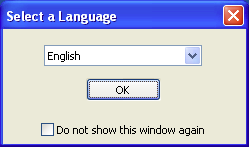
As the window menu's English default option is what I want, I click the button. Puran File Recovery next displays two windows:
(1) a raised Things you should know... window
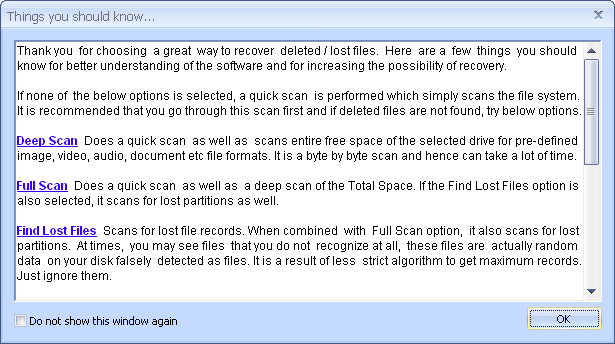
provides a summary of the program's capabilities and
(2) an underlying Puran File Recovery - For Home Users only window
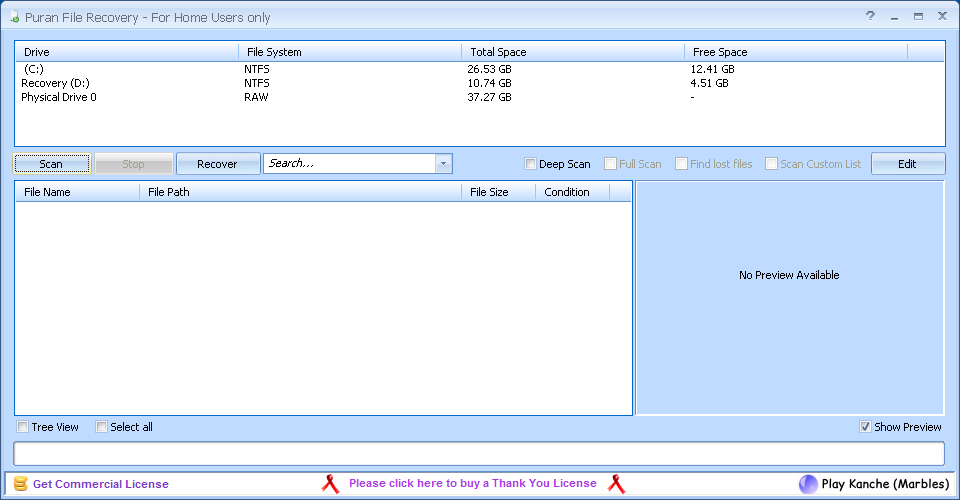
serves as a work area.
The latter window's title bar features a button (to the left of the Minimize button) that when clicked launches a help wizard with relevant screenshots for the program.
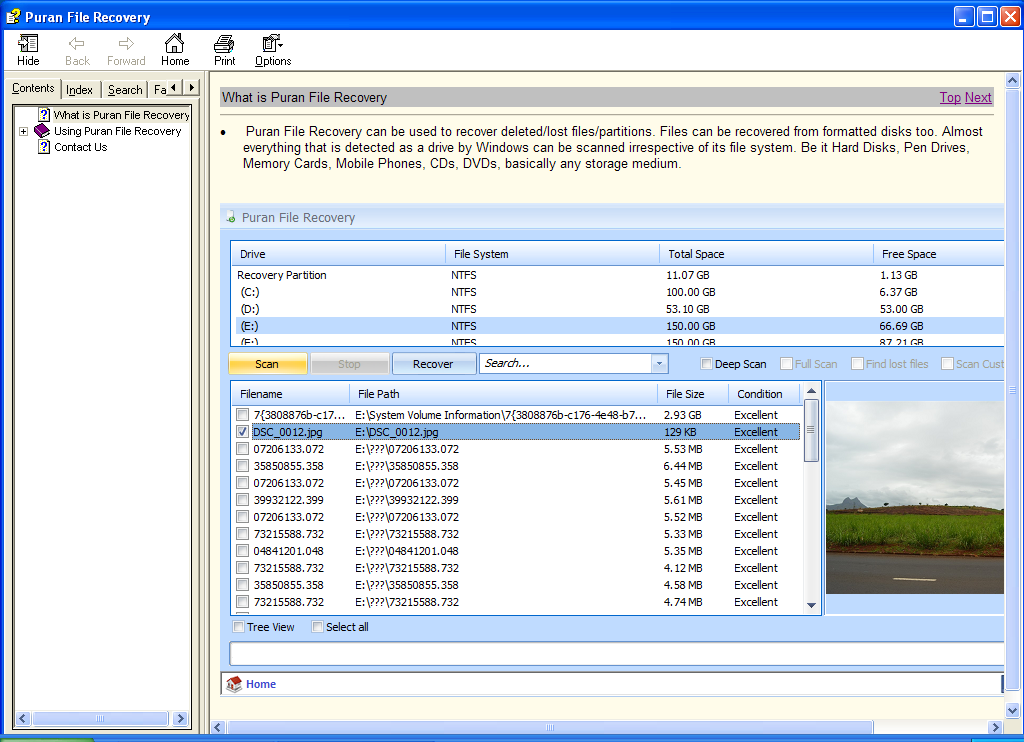
The wizard may be viewed separately at C:\Program Files\Puran File Recovery\Help\File_Recovery.chm: its material is not on the Web as far as I am aware.
Quick
Upon scrolling to its bottom the Things you should know... window recommends:
Deep 1
According to the Using Puran File Recovery → Scan page of the help wizard:
(a) enables but does not check the Full Scan checkbox,
(b) enables and checks the Find lost files checkbox, and
(c) enables and checks the Scan Custom List checkbox.

As regards the Find lost files action, the Using Puran File Recovery → Scan page says:
Customize it
Puran File Recovery has an all-important feature that Recuva does not have: it enables the user to extend the range of the file types it searches for.
As noted above, a deep scan searches for a core set of file types; if the Scan Custom List checkbox is checked, then the core set is augmented with a second, custom set of file types that are detailed in an Edit Custom Scan List window
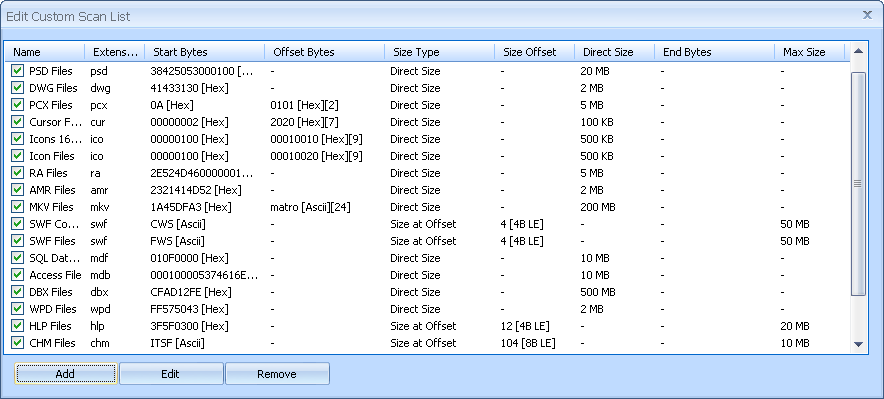
that is displayed when the work area window's button is clicked. You may add more file types to the custom set if you so choose.
As you would intuit from the preceding screenshot, a deep/full scan searches for file types via profiles maintained by the program for those file types: at a minimum each profile contains a file signature (a.k.a. a file magic number) and the position of the signature in the file byte stream; a profile may also contain an indication of file size and/or a characteristic end-byte pattern.
We can search for .wps files by adding a corresponding .wps profile to the custom set database. Toward this end, I first click the button in the Edit Custom Scan List window. Up pops an Add Custom Scan Entry window.
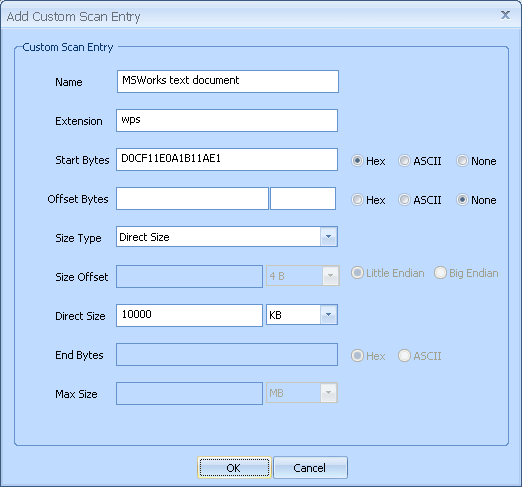
• I find the .wps magic number and its position in the byte stream at this page. The .wps magic number is an 8-byte D0 CF 11 E0 A1 B1 1A E1 hexadecimal pattern and its "offset" is 0 bytes, i.e., it appears at the very beginning of the byte stream. I accordingly type D0CF11E0A1B11AE1 in the Start Bytes field - per the help wizard's Using Puran File Recovery → Custom Scan List page,
• The Size Type field is a selection list comprising Direct Size, Size at Offset, and Look for End Bytes options; I leave it at the Direct Size default as the other two options do not apply to .wps files to the best of my knowledge.
• Having selected a Direct Size Size Type, I set the Direct Size field to 10000 KB as the largest pre-CTB-Locker My Documents\ .wps file was a 9,570 KB Dogs Apr 06.wps file. (I'll have more to say about the Direct Size setting after we run our search.)
• The Extension is of course wps; for the Name I use the MSWorks text document Description on the aforecited .wps magic number page.
After clicking the button we are ready to roll.

Not quite so magic
According to the Using Puran File Recovery → Scan page, a deep/full scan can find .doc files and .xls files and .ppt files (vide supra); however, these file types have the same start-of-stream D0 CF 11 E0 A1 B1 1A E1 signature that .wps files have. Evidently one or more other criteria come into play when distinguishing .doc/.xls/.ppt files - my guess is that they contain other characteristic byte patterns via which they can be told apart - in any case we are going ahead with the above .wps profile and we'll rerun the deep search therewith at the beginning of the following entry.
One particular thing to note - Puran File Recovery identified more files on my test machine than most other tools so be sure to give this one a shot in addition to Recuva if it didn't find what you were looking for.I was p-r-e-t-t-y c-l-o-s-e to throwing in the towel with respect to recovering the CTB-Locker-encrypted My Documents\ .wps files on my father's computer but decided as a last-ditch effort of sorts to see if Puran File Recovery could help me out. So I go to this download page and download the PuranFileRecoverySetup.exe installer executable and then run the installer to install Puran File Recovery.
Help
When launched, Puran File Recovery first displays a Select a Language window.

As the window menu's English default option is what I want, I click the button. Puran File Recovery next displays two windows:
(1) a raised Things you should know... window

provides a summary of the program's capabilities and
(2) an underlying Puran File Recovery - For Home Users only window
serves as a work area.
The latter window's title bar features a button (to the left of the Minimize button) that when clicked launches a help wizard with relevant screenshots for the program.
The wizard may be viewed separately at C:\Program Files\Puran File Recovery\Help\File_Recovery.chm: its material is not on the Web as far as I am aware.
Quick
Upon scrolling to its bottom the Things you should know... window recommends:
In all you should try Quick Scan first, if deleted file is not found, you should go with Deep Scan + Find Lost Files + Scan Custom List and if still not found, go for Full Scan as well.So let's start with a quick scan, which
simply scans the file system. Accordingly, I select the Recovery (D:) drive and click the button in the work area window. My quick scan takes about 10 seconds and returns 6,222 files. To the right of the button is a Search... text input-menu in which I can type *.wps so as to (after hitting the Enter key) filter the results for .wps files: nothing comes up when I do so.
Deep 1
According to the Using Puran File Recovery → Scan page of the help wizard:
Deep Scan When you are not able to recover your files with Quick Scan, you should try Deep Scan. This option performs a Quick Scan plus scans entire free space of the selected drive byte by byte and tries to find following format files -Hmmm, I don't see WPS up there, do you? But let's try a deep scan anyway. I reselect the Recovery (D:) drive, clear the Search... field, and check the Deep Scan checkbox in the work area window. Checking the Deep Scan checkbox
JPG BMP PNG GIF MP3 WAV OGG WMA WMV DOC XLS PPT DOCX XLSX PPTX PDF ZIP RAR MP4 AVI CAB RTF NEF CR2 DNG PST OST MPG ODT ODS ODP ODB ODG ODF
(a) enables but does not check the Full Scan checkbox,
(b) enables and checks the Find lost files checkbox, and
(c) enables and checks the Scan Custom List checkbox.
As regards the Find lost files action, the Using Puran File Recovery → Scan page says:
In addition, if Find Lost Files Option is selected, Deep Scan also detects the file records that were lost. This ensures that where ever possible you get the file name and in many cases file path too. Also, since files are listed as per the information in the record, recovery is mostly more accurate.This certainly seems like something we want, doesn't it? As regards the Scan Custom List action, I'll have lots more to say about it in the next section. I go ahead and click the button. My deep scan takes about 20 minutes and returns 8,097 files. A *.wps filter again returns nothing. However, there's no need to run to a full scan just yet...
Customize it
Puran File Recovery has an all-important feature that Recuva does not have: it enables the user to extend the range of the file types it searches for.
As noted above, a deep scan searches for a core set of file types; if the Scan Custom List checkbox is checked, then the core set is augmented with a second, custom set of file types that are detailed in an Edit Custom Scan List window
that is displayed when the work area window's button is clicked. You may add more file types to the custom set if you so choose.
As you would intuit from the preceding screenshot, a deep/full scan searches for file types via profiles maintained by the program for those file types: at a minimum each profile contains a file signature (a.k.a. a file magic number) and the position of the signature in the file byte stream; a profile may also contain an indication of file size and/or a characteristic end-byte pattern.
We can search for .wps files by adding a corresponding .wps profile to the custom set database. Toward this end, I first click the button in the Edit Custom Scan List window. Up pops an Add Custom Scan Entry window.

• I find the .wps magic number and its position in the byte stream at this page. The .wps magic number is an 8-byte D0 CF 11 E0 A1 B1 1A E1 hexadecimal pattern and its "offset" is 0 bytes, i.e., it appears at the very beginning of the byte stream. I accordingly type D0CF11E0A1B11AE1 in the Start Bytes field - per the help wizard's Using Puran File Recovery → Custom Scan List page,
there should not be any spacebetween the Start Bytes characters; meanwhile, the Start Bytes Hex radio button is checked by default - and set the Offset Bytes field to None.
• The Size Type field is a selection list comprising Direct Size, Size at Offset, and Look for End Bytes options; I leave it at the Direct Size default as the other two options do not apply to .wps files to the best of my knowledge.
• Having selected a Direct Size Size Type, I set the Direct Size field to 10000 KB as the largest pre-CTB-Locker My Documents\ .wps file was a 9,570 KB Dogs Apr 06.wps file. (I'll have more to say about the Direct Size setting after we run our search.)
• The Extension is of course wps; for the Name I use the MSWorks text document Description on the aforecited .wps magic number page.
After clicking the button we are ready to roll.
Not quite so magic
According to the Using Puran File Recovery → Scan page, a deep/full scan can find .doc files and .xls files and .ppt files (vide supra); however, these file types have the same start-of-stream D0 CF 11 E0 A1 B1 1A E1 signature that .wps files have. Evidently one or more other criteria come into play when distinguishing .doc/.xls/.ppt files - my guess is that they contain other characteristic byte patterns via which they can be told apart - in any case we are going ahead with the above .wps profile and we'll rerun the deep search therewith at the beginning of the following entry.
Thursday, September 10, 2015
Profiles in PC Poisoning, Part 6
Having introduced the Recuva file recovery program in the previous post, it's time to get down to brass tacks and see what we can rescue therewith.
On the Recuva Documentation's "Recuva FAQ (Frequently Asked Questions)" page, a • Fragmentation bullet point notes:
Start → Programs → Accessories → System Tools → Disk Defragmenter.
Regular
Subsequently, a regular scan of the D:\ volume finds 6,221 potentially recoverable files. In the advanced mode,
(a) a *.wps filter returns 0 files,
(b) a *.jpg filter returns 20 files, and
(c) a *.pdf filter returns 0 files.
All of the *.jpg hits are preceded by a ● circle indicating that their recovery is
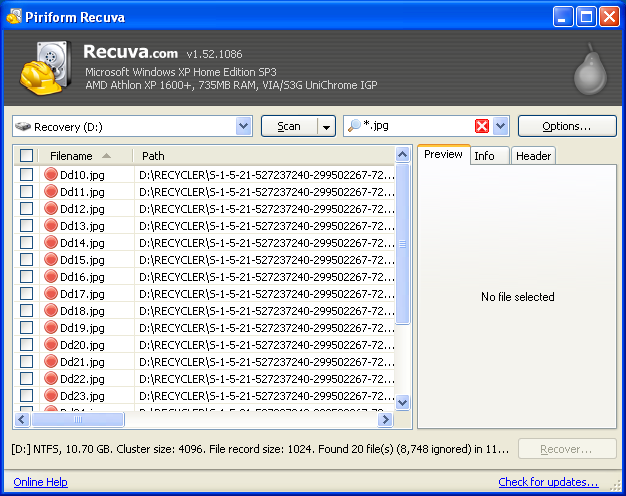
See the Recuva Documentation's "Undelete and the Recycle Bin in Windows" page for a brief explanation of the Dd#.jpg name format.
Horizontally scrolling the results field brings into view a State column that pronounces the Filename files "Unrecoverable" and a Comment column that provides a
This file is overwritten with "D:\pathname\filename.ext"
message for each file.
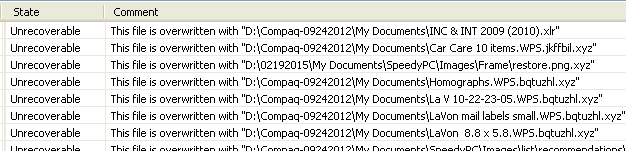
According to the Path column, the Filename files are located in the D:\RECYCLER\ directory, more specifically a D:\RECYCLER\5-1-5-21-527237240-299502267-725345543-1003\ directory. A RECYCLER\ directory is normally hidden but can be visibilized by checking the
Show hidden files and folders
radio button AND unchecking the
Hide protected operating system files (Recommended)
checkbox in the Advanced settings: menu on the View tab of the My Computer → Tools → Folder Options window.
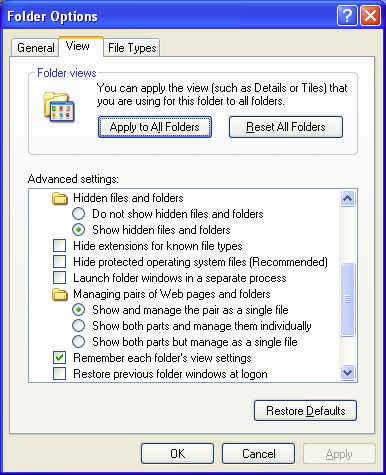
A visit to the D:\RECYCLER\5...1003\ directory confirms that the Dd#.jpg files are well and truly gone - your guess is as good as mine as to why they turn up in the first place. I nonetheless try to recover a couple of them:
(1) I check the test files' checkboxes on the left-hand side of the results window; checking the checkboxes enables the currently disabled button in the window's southeast corner.
(2-3) I click the button: up pops a Browse For Folder window (see below for a screenshot), via which I place the files in the C:\ volume.
Double-clicking the recovered files' icons does launch the Windows Picture and Fax Viewer but all I see therein is a
No preview available
message vis-à-vis a rendered image.
Deep
The wizard-mode Thank you, Recuva is now ready to search for your files window tells us that we should run a "deep scan"
(a) checking the
Enable Deep Scan
checkbox in the wizard-mode Thank you... window or
(b) checking the
Deep Scan (increases scan time)
checkbox on the Actions tab of the advanced-mode Options window.
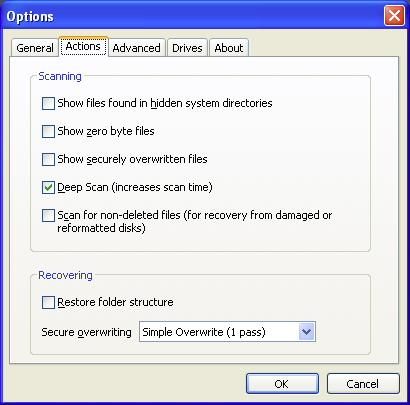
A deep scan of the D:\ volume (which takes ≈ 20 minutes vis-à-vis ≈ 12 seconds for a regular scan) finds 7,516 potentially recoverable files. In the advanced mode,
(a) a *.wps filter returns 0 files,
(b) a *.jpg filter returns 425 files, and
(c) a *.pdf filter returns 21 files.
The Recuva Documentation's "Deep Scan option" page specifies those file (extension) types that can be identified by a deep scan and .wps isn't one of them, so it's not such a surprise that our search didn't return any .wps files.
Regarding the *.jpg hits, the Dd#.jpg files are still there but now we also have 405 files that are linked to a ?\ directory and whose prospect of recovery is excellent: they're preceded by a ● circle, the State column pronounces them "Excellent", and their Comment column messages read No overwritten clusters detected. For almost all of the ● files, clicking a file name displays an image preview on the Preview tab on the right-hand side of the results window.
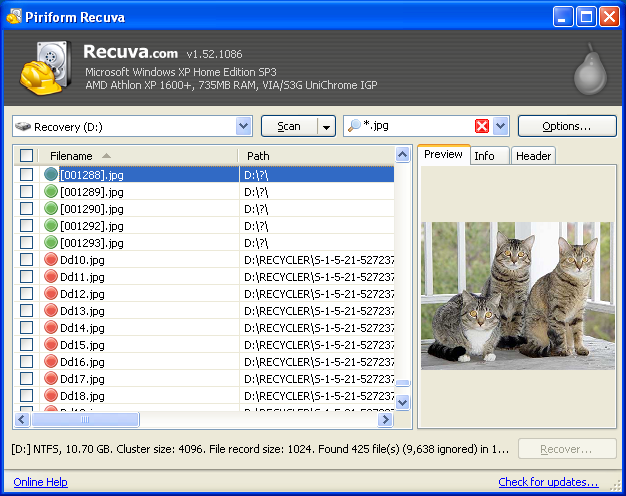
The ● files have a [#].jpg name format because, per the aforecited "Deep Scan option" page,
It gets better: I am able to pick out 64 ● files that contain photos belonging to my father's pre-CTB-Locker collection of My Documents\ .jpg photos. (The Options → View mode → Thumbnails View is helpful in this regard.) I check the files' checkboxes and click the button. In the Browse For Folder window I go to the C:\ volume and then click the button, which creates a New Folder\ directory, which I rename Recuva rescued images\.
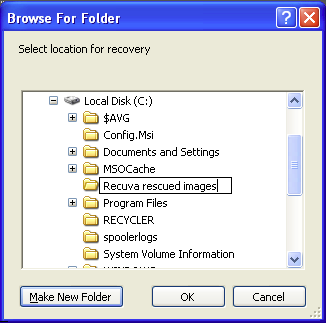
I click the button and then go to
My Computer → Local Disk (C:) → Recuva rescued images
to see how it all came out: quite gratifyingly, the recovered files are good to go.
So, 64 out of 100 - not quite Meat Loaf's standard but I'll take it. Mitigating circumstances regarding the missing files:
• I don't know what state those files were in to begin with.
• Their .jpg extension notwithstanding, I don't know if they really were .jpg images versus some other image format (e.g., .bmp, .gif) or, for that matter, if they really were 'pure' images versus documents that commingled images and text.
• Some of the original photos were duplicates.
• Finally, I can't rule out that I didn't pick out all of the relevant Recuva results.
As for the *.pdf hits, their prospect of recovery is excellent as well; they don't give previews so I recover the entire lot as described above (I put them in a Recuva rescued documents\ directory). They're OK too, and all of them belong to my father's pre-CTB-Locker set of My Documents\ .pdf files.
I am able to recover some of the original .wps files via a different file recovery program and I'll tell you all about it in the following entry.
On the Recuva Documentation's "Recuva FAQ (Frequently Asked Questions)" page, a • Fragmentation bullet point notes:
If a file is fragmented, you can recover it from an NTFS-formatted drive, but it may be less likely to be recovered.I accordingly begin by re-defragmenting the D:\ volume. FYI, I am now able to launch the Disk Defragmenter utility via the Start menu:
Start → Programs → Accessories → System Tools → Disk Defragmenter.
Regular
Subsequently, a regular scan of the D:\ volume finds 6,221 potentially recoverable files. In the advanced mode,
(a) a *.wps filter returns 0 files,
(b) a *.jpg filter returns 20 files, and
(c) a *.pdf filter returns 0 files.
All of the *.jpg hits are preceded by a ● circle indicating that their recovery is
unlikely.

See the Recuva Documentation's "Undelete and the Recycle Bin in Windows" page for a brief explanation of the Dd#.jpg name format.
Horizontally scrolling the results field brings into view a State column that pronounces the Filename files "Unrecoverable" and a Comment column that provides a
This file is overwritten with "D:\pathname\filename.ext"
message for each file.

According to the Path column, the Filename files are located in the D:\RECYCLER\ directory, more specifically a D:\RECYCLER\5-1-5-21-527237240-299502267-725345543-1003\ directory. A RECYCLER\ directory is normally hidden but can be visibilized by checking the
Show hidden files and folders
radio button AND unchecking the
Hide protected operating system files (Recommended)
checkbox in the Advanced settings: menu on the View tab of the My Computer → Tools → Folder Options window.

A visit to the D:\RECYCLER\5...1003\ directory confirms that the Dd#.jpg files are well and truly gone - your guess is as good as mine as to why they turn up in the first place. I nonetheless try to recover a couple of them:
(1) I check the test files' checkboxes on the left-hand side of the results window; checking the checkboxes enables the currently disabled button in the window's southeast corner.
(2-3) I click the button: up pops a Browse For Folder window (see below for a screenshot), via which I place the files in the C:\ volume.
Double-clicking the recovered files' icons does launch the Windows Picture and Fax Viewer but all I see therein is a
No preview available
message vis-à-vis a rendered image.
Deep
The wizard-mode Thank you, Recuva is now ready to search for your files window tells us that we should run a "deep scan"
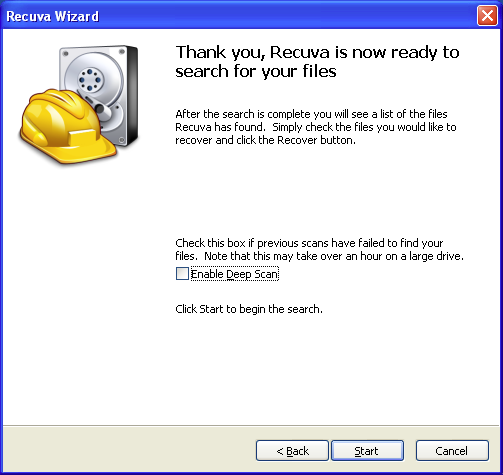
if previous scans have failed to find your files. For a deep scan, Recuva
look[s] through your drive bit by bit, more specifically, it
searches every cluster (block) of the drive to find file headers indicating the start of a file. Let's get a deep scan under way, then, shall we? We can enable a deep scan (toggle from a regular scan to a deep scan) by either
(a) checking the
Enable Deep Scan
checkbox in the wizard-mode Thank you... window or
(b) checking the
Deep Scan (increases scan time)
checkbox on the Actions tab of the advanced-mode Options window.

A deep scan of the D:\ volume (which takes ≈ 20 minutes vis-à-vis ≈ 12 seconds for a regular scan) finds 7,516 potentially recoverable files. In the advanced mode,
(a) a *.wps filter returns 0 files,
(b) a *.jpg filter returns 425 files, and
(c) a *.pdf filter returns 21 files.
The Recuva Documentation's "Deep Scan option" page specifies those file (extension) types that can be identified by a deep scan and .wps isn't one of them, so it's not such a surprise that our search didn't return any .wps files.
Regarding the *.jpg hits, the Dd#.jpg files are still there but now we also have 405 files that are linked to a ?\ directory and whose prospect of recovery is excellent: they're preceded by a ● circle, the State column pronounces them "Excellent", and their Comment column messages read No overwritten clusters detected. For almost all of the ● files, clicking a file name displays an image preview on the Preview tab on the right-hand side of the results window.

The ● files have a [#].jpg name format because, per the aforecited "Deep Scan option" page,
a deep scan can only recover files, not [original] file names.
It gets better: I am able to pick out 64 ● files that contain photos belonging to my father's pre-CTB-Locker collection of My Documents\ .jpg photos. (The Options → View mode → Thumbnails View is helpful in this regard.) I check the files' checkboxes and click the button. In the Browse For Folder window I go to the C:\ volume and then click the button, which creates a New Folder\ directory, which I rename Recuva rescued images\.
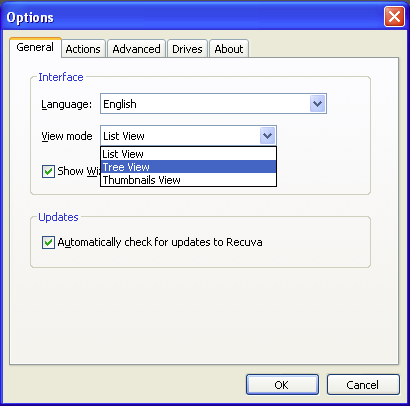

I click the button and then go to
My Computer → Local Disk (C:) → Recuva rescued images
to see how it all came out: quite gratifyingly, the recovered files are good to go.
So, 64 out of 100 - not quite Meat Loaf's standard but I'll take it. Mitigating circumstances regarding the missing files:
• I don't know what state those files were in to begin with.
• Their .jpg extension notwithstanding, I don't know if they really were .jpg images versus some other image format (e.g., .bmp, .gif) or, for that matter, if they really were 'pure' images versus documents that commingled images and text.
• Some of the original photos were duplicates.
• Finally, I can't rule out that I didn't pick out all of the relevant Recuva results.
As for the *.pdf hits, their prospect of recovery is excellent as well; they don't give previews so I recover the entire lot as described above (I put them in a Recuva rescued documents\ directory). They're OK too, and all of them belong to my father's pre-CTB-Locker set of My Documents\ .pdf files.
I am able to recover some of the original .wps files via a different file recovery program and I'll tell you all about it in the following entry.
Subscribe to:
Posts (Atom)